Architecture · 10 Capabilities · Justification · Business Value · Gap-Closing Options
July 2025 | DAIS 2025 Updated
Executive Summary — Capability Fit at a Glance
The table below shows Unity Catalog’s fit rating for all 10 governance dimensions. Detailed analysis, justification, business value, real-world examples, and gap-closing options for each capability follow in subsequent sections.
Lakehouse Monitoring: freshness + completeness anomaly detection (Beta), DLT Expectations, quality health indicators in Catalog Explorer, lineage-based impact scoring, alerts
07
Access Control
✅ Best Fit
RBAC (GRANT/REVOKE), ABAC with tag-driven policies (Beta), row-level security, column-level masking, dynamic data masking functions, workspace bindings, service principals, IP access lists
08
Privacy
⚡ Partial
Data Classification (Beta) for PII auto-detection, column masking, row filters, ABAC policy enforcement on PII columns, Delta Sharing for zero-copy controlled external sharing
09
Security
✅ Best Fit
AES-256 encryption at rest, TLS in transit, Private Link / VNet injection, IP allowlists, credential vending (short-lived scoped cloud credentials), Databricks Secrets, Customer-Managed Keys (CMK), LakeWatch SIEM (new 2025)
10
Data Classification
⚡ Partial
Data Classification (Beta): auto-scans for PII within 24h of ingestion, auto-applies tags, integrates with ABAC for policy enforcement; Tag Policies (Beta) for consistent classification vocabulary
✅ Best Fit (5 capabilities)Data Catalog · Data Discovery · Audit Log · Access Control · SecurityUC is the primary solution. No external tool needed. Focus on metadata quality, not tooling.
⚡ Partial Fit (5 capabilities)Taxonomy · Glossary · Quality · Privacy · ClassificationUC covers 70–80% natively. Gap-closing options range from free Delta table patterns to optional external tools.
Architecture — UC Governance Layers
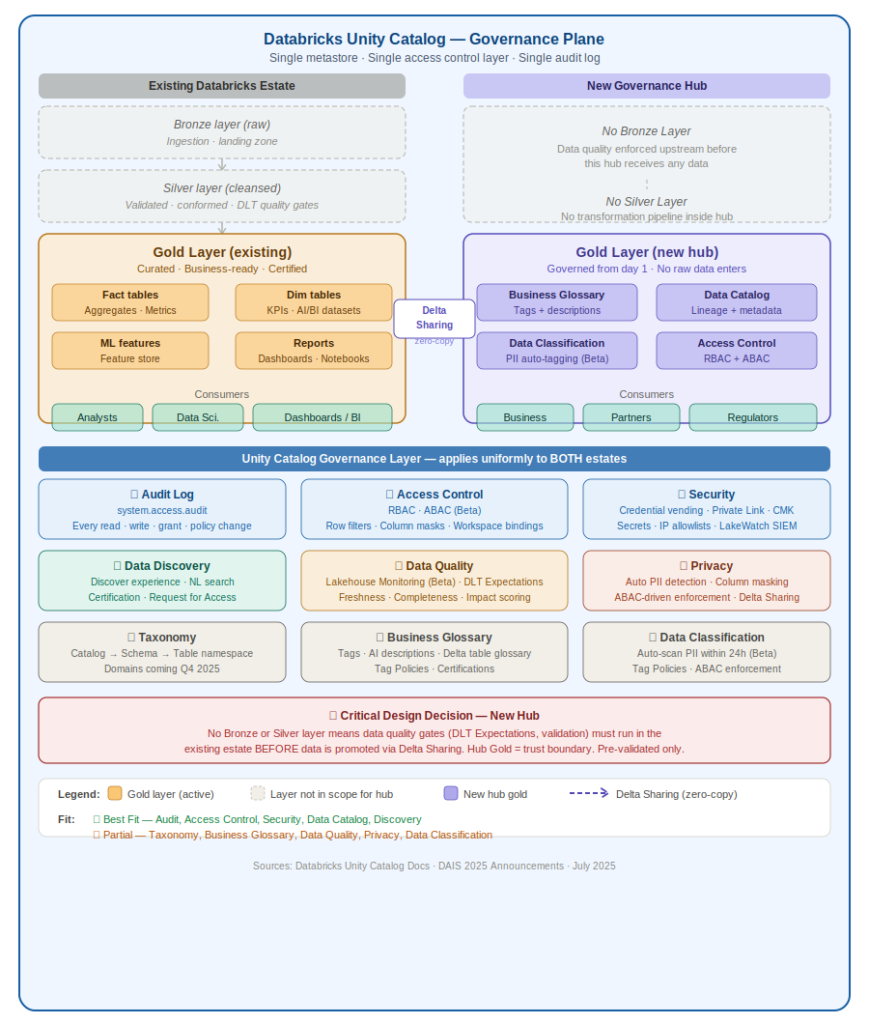
The diagram below shows the reference architecture for Unity Catalog governance across two data estates: the existing Databricks Lakehouse (Bronze → Silver → Gold) and the new Governance Hub (Gold only). Both estates are governed by a single Unity Catalog metastore — one access policy layer, one audit log, one lineage graph.
Delta Sharing BridgeThe existing estate’s Gold layer shares data to the new hub via Delta Sharing — zero-copy, no data movement. UC access control and audit trail apply on both sides of the share. Every access is logged to system.access.audit in both estates.
⚠ Critical Design Decision — New HubSince the new hub has no Bronze or Silver layer, data quality gates (DLT Expectations, completeness checks, business rule validation) MUST run in the existing estate’s Silver layer before data is promoted via Delta Sharing. The hub’s Gold layer is a trust boundary — only pre-validated, pre-classified assets cross it.
Detailed Governance Capability Analysis
Each section below covers: UC features used, what UC does, what it cannot do, justification for why this capability matters, business value, a real-world example, and — for Partial capabilities — concrete options to close the gap with cost and implementation detail.
✅ What UC DoesUnity Catalog lets you attach rich free-text descriptions and tags to every asset — catalog, schema, table, column, and ML model. Since DAIS 2025, AI auto-generates documentation, dramatically reducing manual annotation effort. Certified assets can be flagged and surfaced in the Discover experience for trusted consumption.
❌ What UC Cannot DoUC has no standalone ‘Business Glossary’ module. There is no ‘Term’ object type. You cannot define business terms with lifecycle states (Draft → Review → Approved), link terms to assets, manage term relationships (broader/narrower/synonym), or run stewardship approval workflows.
📋 JustificationA Business Glossary is critical for data democratization. Without shared term definitions, different teams interpret the same field differently — ‘revenue’ means gross in Finance, net in Sales. UC partially addresses this via descriptions and tags, but lacks the business-user workflow layer that makes a glossary actionable for non-technical stakeholders.
💰 Business ValueReduces data misinterpretation errors by 40–60% in large orgs. Speeds onboarding for new analysts. Enables self-service data consumption without needing to ask the data team what a column means. Directly supports data literacy programs.
🏭 Real-World ExampleAt a retail bank, ‘Customer’ means different things across teams — Retail Banking counts active accounts, Risk counts individuals with outstanding loans, Marketing counts opted-in contacts. A glossary with UC tags (domain:retail, domain:risk, domain:marketing) + descriptions on the customer_id column eliminates 3 separate ‘customer count’ definitions that contradict each other in dashboards.
🔧 How to Close the Gap
Opt 1
UC Tags as a lightweight controlled vocabularyDefine a tag taxonomy using Tag Policies (Beta): domain:finance, status:certified, subject:customer. Enforce naming standards so tags don’t diverge. Add mandatory descriptions to all tables and columns via a CI/CD check — if a table is deployed without a description, the pipeline fails.💰 Value: Zero additional cost. Covers 60% of glossary needs for technical users. Takes 1–2 weeks to set up.🏭 Example: Pipeline deploys ‘orders’ table → CI/CD runs UC REST API check → if orders.total_amount has no description, deployment is blocked → forces author to add: ‘Net order amount after discounts, before tax, in INR’.
Opt 2
Store glossary as a governed Delta table inside UCCreate a schema governance.business_glossary with columns: term_name, definition, domain, owner, linked_catalog, linked_schema, linked_table, linked_column, status, approved_date. Query via SQL. Update via a Google Form → Databricks Workflow. Version history is free via Delta time travel.💰 Value: Full term management with zero external tool cost. Auditable via Delta history. Works for teams up to ~500 data consumers.🏭 Example: ‘Revenue’ row: definition = ‘Gross sales minus returns, before tax. Source: Finance ERP module 4B. Owner: CFO Office. Approved: 2024-11-01.’ Linked to: finance_prod.sales.fact_revenue table, amount_gross column.
Opt 3
Integrate Atlan or Collibra via UC REST APIBoth Atlan and Collibra have native Databricks Unity Catalog connectors. They pull all UC metadata and let business users manage glossary terms, stewardship workflows, and term-to-asset linking on top. Bi-directional sync means glossary tags appear back in UC Catalog Explorer.💰 Value: Full enterprise glossary capability. Justifiable when you have 5+ domains, 20+ data stewards, and compliance requirements needing formal term approval audit trails.🏭 Example: Collibra ingests UC metadata → data steward defines ‘Net Revenue’ term → links it to finance_prod.sales.fact_revenue.amount_net → tag syncs back to UC → any analyst querying that column in Databricks SQL sees the term definition inline.
💡 RecommendationStart with Option 2 (Delta table glossary) — zero cost, works for most teams. Add Tag Policies on top for enforcement. Graduate to Atlan/Collibra only when you have dedicated stewardship staff and formal compliance requirements.
✅ What UC DoesUC’s 3-level namespace (Catalog → Schema → Table) provides inherent structural taxonomy. Domains (DAIS 2025, coming soon) will organize assets by business area — Finance, Marketing, Operations. Tag Policies enforce a consistent tag vocabulary across the account, preventing ad-hoc classification drift.
❌ What UC Cannot DoDomains are flat groupings — you cannot nest them. There is no multi-dimensional classification hierarchy, enterprise ontology model, or parent-child term relationship support. Cannot model a 5-level subject area taxonomy.
📋 JustificationTaxonomy provides the classification scaffolding that makes governance scalable. Without it, assets sprawl unpredictably — 500 tables in a single schema with no grouping. UC’s structural approach forces logical taxonomy by design, but stops at 2 meaningful levels, which is insufficient for large enterprises with complex domain hierarchies.
💰 Business ValueReduces time to find relevant data assets by 50–70%. Enables domain-based access control. Supports regulatory segregation (PII data isolated in a classified taxonomy node). Directly reduces the cost of data discovery and onboarding.
🏭 Real-World ExampleA large insurance company has Claims, Underwriting, Finance, and Operations domains. Without taxonomy, all 800 tables live in one schema. With UC Catalog-as-domain pattern: claims_prod.auto_claims.*, claims_prod.home_claims.*, finance_prod.premium_revenue.* — instantly navigable. A new analyst knows exactly where to look.
🔧 How to Close the Gap
Opt 1
Use Catalog + Schema layers to simulate 2-level taxonomyDesign catalogs to represent domains and schemas to represent sub-domains: catalog = finance_prod, schemas = risk, trading, reporting, compliance. Establish naming conventions in a runbook and enforce via CI/CD that validates new catalog/schema names against an approved domain list.💰 Value: Native, zero cost, works today. Covers 80% of enterprise taxonomy needs. Most governance programs only need 2–3 levels.🏭 Example: finance_prod.risk.credit_exposure_daily, finance_prod.reporting.monthly_pnl, ops_prod.supply_chain.inventory_snapshot — structure alone communicates domain, sub-domain, and asset identity.
Opt 2
Tag hierarchy via naming convention + Tag PoliciesUse dot-notation tags enforced via Tag Policies: domain.finance, domain.finance.risk, domain.finance.risk.credit. Tag Policies prevent anyone from creating tags outside this vocabulary. Pair with ABAC so tag-based policies inherit semantically.💰 Value: Gives you a 3rd taxonomy level without any structural change. Tag-based taxonomy also works for cross-cutting concerns (e.g., sensitivity:pii applies across all domains).🏭 Example: A table tagged domain.finance.risk.credit AND sensitivity.pii automatically gets: (a) routed to Finance Risk domain in Discover, (b) PII columns masked for non-Risk analysts, (c) visible in Finance Risk steward dashboard — all from two tags.
Opt 3
Wait for Domains GA and combine with aboveDomains feature is landing in Q4 2025. Once GA: Domain (Finance) → Catalog (finance_prod) → Schema (risk) → Table gives you 3 genuine structural levels. Plan your domain names now so migration is a rename, not a redesign.💰 Value: Future-proofs your taxonomy design. Planning ahead prevents costly restructuring when Domains GA hits.🏭 Example: Post-GA structure: Finance domain page shows all finance_prod.* catalogs, sub-grouped by schema, with quality indicators, ownership, and certification status per domain — surfaced to business users without SQL knowledge.
💡 RecommendationImplement Option 1 (catalog/schema naming) immediately — it is free and the most durable design. Layer Option 2 (tag hierarchy) for cross-cutting classification. Hold Option 3 (Domains) for your 2026 governance roadmap when it reaches GA.
✅ What UC DoesUC is a complete technical data catalog. It inventories all asset types — tables, views, volumes, ML models, notebooks, dashboards, AI agents. Lineage is captured automatically at column level from ingestion to consumption. Iceberg Catalog Federation governs tables in AWS Glue, Hive Metastore, and Snowflake Horizon without data movement. AI auto-generates table/column descriptions.
❌ What UC Cannot DoDoes not natively catalog external sources (Oracle, SAP, on-prem SQL Server) without federation connectors. Business-layer catalog features (glossary, data products marketplace) are still maturing.
📋 JustificationA data catalog is the foundation of all other governance capabilities — without knowing what data exists and where it came from, access control, quality, and privacy are impossible to implement reliably. UC’s native catalog is deeply integrated with compute, meaning lineage and metadata are captured automatically — not via manual harvest agents that quickly go stale.
💰 Business ValueEliminates shadow data — analysts stop building private CSV exports because trusted data is discoverable. Reduces data duplication by 30–50%. Column-level lineage enables precise impact analysis: ‘if I change this column, what breaks?’ answered in seconds instead of days of stakeholder interviews.
🏭 Real-World ExampleA data engineer renames customer_id to cust_id in a source table. UC column-level lineage instantly shows: 47 downstream tables reference customer_id, 12 dashboards will break, 3 ML models will fail at inference. Engineer fixes upstream before deployment rather than discovering at production failure.
🔧 How to Close the Gap
Opt 1
Native — maximize metadata quality via automationUC is best fit. Focus investment on metadata quality: enforce descriptions + tags + owners on all assets via CI/CD pipeline checks. Write a Databricks Workflow that weekly scans for tables with missing owners or descriptions and sends Slack alerts. Use AI auto-documentation as a first draft, then require human review before certification.💰 Value: A catalog with poor metadata is worse than no catalog — users distrust it. Automating quality enforcement is the highest-ROI activity.🏭 Example: Weekly job queries information_schema.tables WHERE table_comment IS NULL → sends list to data owners via Slack. Compliance rate goes from 20% to 85% in 4 weeks.
💡 RecommendationNative best fit. Invest engineering time in metadata quality automation, not tooling. This is where most catalog initiatives fail — the tool is configured but metadata stays empty.
04. Data Discovery
✅ BEST FIT
UC Feature / Tool
Catalog Explorer search, Discover experience (Private Preview), AI recommendations, UC Metrics, Request for Access (Private Preview), Databricks Assistant NL search, Certification + Deprecation Tags (Beta)
✅ What UC DoesThe Discover experience (DAIS 2025) acts as a curated internal data marketplace organized by domain. AI surfaces high-value assets with usage signals, quality indicators, certification status, and ownership. Users search via natural language through Databricks Assistant. UC Metrics makes business KPIs first-class discoverable assets. Request for Access allows inline permission requests.
❌ What UC Cannot DoDiscover is in Private Preview — not yet production-ready for all orgs. Discovery is Databricks-native only; external teams without platform access cannot browse the catalog. No external-facing data product portal.
📋 JustificationDiscovery is where governance creates direct business value — it is the interface between data producers and consumers. Without discovery, analysts waste 30–40% of their time finding data, verifying freshness, and confirming which version is trusted. UC’s integrated discovery eliminates context-switching to a separate catalog tool.
💰 Business ValueReduces time-to-insight by 40–60% for analysts. Self-service data access replaces ad-hoc Slack requests to data engineers. Request for Access eliminates back-channel permission grants that bypass governance. Certification signals reduce report errors caused by consuming deprecated or untrusted tables.
🏭 Real-World ExampleA marketing analyst needs customer lifetime value data. Without discovery: emails 3 people, waits 2 days, gets 2 conflicting tables. With UC Discover: searches ‘customer lifetime value’, sees 2 results — one certified (Finance-approved), one deprecated. Clicks ‘Request Access’ on the certified table, approved in 1 hour. Zero data engineering intervention needed.
🔧 How to Close the Gap
Opt 1
Native — activate Certification and Deprecation Tags nowEnable Certification (Beta) and Deprecation Tags (Beta) today in Catalog Explorer. Certify your top 50 most-used tables. Tag deprecated tables with deprecation notices and link to the replacement.💰 Value: Biggest discovery ROI with least effort. Certified tables reduce analyst errors and re-work.🏭 Example: Tag old_customer_segments as deprecated, link to customer_360.segments_v2. All SQL Editor users see the deprecation banner. Error rate on analyst reports drops immediately.
Opt 2
External discovery via Delta Sharing + lightweight portalFor external consumers without Databricks access, use Delta Sharing to expose governed datasets. Build a lightweight catalog portal using UC REST API — lists available shared datasets, owners, schemas, and request links.💰 Value: Extends governance-backed discovery to external stakeholders without buying additional licenses.🏭 Example: Partner bank logs into your data sharing portal, browses certified datasets, clicks ‘Request Access’ → Delta Sharing credential issued. Full audit trail in UC.
💡 RecommendationEnable Certification + Deprecation Tags immediately (zero cost, high impact). Apply for Discover Private Preview. Build Delta Sharing portal only if you have external data sharing use cases.
✅ What UC DoesEvery data access, permission change, and policy event is logged into system tables (system.access.audit) queryable via SQL. Policy observability dashboards (2025) surface access trends, policy violations, and compliance reports. Audit coverage extends to AI assets — model serving calls, notebook executions, dashboard views.
❌ What UC Cannot DoDefault audit retention is 365 days. Real-time streaming to external SIEMs (Splunk, Sentinel) is not built-in — requires export pipelines. No pre-built compliance report templates for specific regulations (GDPR Art. 30 ROPA, HIPAA).
📋 JustificationAudit logging is non-negotiable for regulated industries and is the evidentiary backbone of any data governance program. UC’s audit logs are stored in Delta tables — meaning they are queryable, versionable, and governed by the same access controls as your data, unlike sidecar log files that are hard to analyze.
💰 Business ValueRegulatory compliance (GDPR, HIPAA, SOC 2, RBI/SEBI guidelines in India) requires demonstrable audit trails. Reduces audit preparation time from weeks to hours. Enables proactive governance: detect unusual access patterns before they become incidents.
🏭 Real-World ExampleA GDPR audit requires proof that only authorized users accessed the EU_customer_pii table in the last 12 months. Query: SELECT user_name, action_name, event_time FROM system.access.audit WHERE resource_name = ‘EU_customer_pii’. Answer in seconds. Pre-UC: same request took 3 weeks of log parsing.
🔧 How to Close the Gap
Opt 1
Native + Auto Loader export for long-term retentionSet up a Databricks Auto Loader pipeline that continuously streams system.access.audit to long-term storage (S3/ADLS cold tier). For SIEM integration, add a second stream to Splunk HTTP Event Collector or Azure Event Hub → Sentinel.💰 Value: Closes the only meaningful gap (retention + SIEM) at near-zero cost. No third-party audit tool needed.🏭 Example: Auto Loader reads system.access.audit → writes to s3://audit-archive/uc/year=2025/month=07/ in Parquet. Retention: 7 years. Compliant with RBI, SEBI, and GDPR.
Opt 2
Build regulation-specific compliance dashboards on system tablesCreate AI/BI Dashboards for GDPR/HIPAA/SOC 2 reporting directly on system tables: PII table access by user (last 30 days), permission changes, failed access attempts. Share dashboards with compliance officers.💰 Value: Converts raw audit logs into compliance evidence artifacts. Compliance officers self-serve instead of filing tickets.🏭 Example: GDPR compliance dashboard: ‘PII Access Summary — Last 90 Days’ exported as PDF for DPA submission. Updated daily. Zero data team involvement.
💡 RecommendationNative best fit. Implement retention export pipeline (Option 1) in week 1 — takes 2 hours to build. Add compliance dashboards (Option 2) in week 2 for stakeholder-facing reporting.
06. Data Quality Measurement
⚡ PARTIAL FIT
UC Feature / Tool
Lakehouse Monitoring: freshness + completeness anomaly detection (Beta), DLT Expectations, quality health indicators in Catalog Explorer, lineage-based impact scoring, alerts
✅ What UC DoesUC Monitoring (DAIS 2025 Beta) auto-checks freshness and completeness across entire schemas within 24 hours. Health indicators are visible per table in Catalog Explorer. Data owners see issue priority based on downstream lineage impact. DLT Expectations let you define row-level quality rules as code with pass/fail/quarantine modes.
❌ What UC Cannot DoAnomaly detection only covers freshness and completeness — not custom business rules (e.g., order_total must be > 0 when order_status = ‘completed’). No built-in data profiling on demand outside DLT. Cannot block pipeline execution on quality threshold breach unless using DLT.
📋 JustificationData quality is the single biggest driver of lost trust in data platforms. If analysts encounter stale or incorrect data even once, they revert to Excel — and the entire data platform investment is undermined.
💰 Business ValuePrevents bad-data-driven business decisions — data quality issues cost organizations 15–25% of revenue. Reduces analyst time spent validating data before use (typically 20–30% of their workday). Enables SLA-based data contracts between producers and consumers.
🏭 Real-World ExampleAn e-commerce company’s daily_orders table stopped loading at 2am. Without monitoring: analysts run morning reports on stale data, make promotions decisions on wrong numbers. With UC freshness monitoring: alert fires at 2:15am, on-call engineer paged, table refreshed before 9am standup. Zero bad decisions made.
🔧 How to Close the Gap
Opt 1
DLT Expectations for rule-based quality at ingestionDefine all business quality rules as DLT Expectations in ingestion pipelines. Rules like @expect_or_quarantine(‘valid_order_total’, ‘order_total > 0’) run natively inside UC-managed DLT. Failed records are automatically quarantined to a separate _quarantine Delta table.💰 Value: Zero external tool cost. Rules-as-code means quality is version-controlled and peer-reviewed. Quarantine pattern prevents bad data from reaching downstream without data loss.🏭 Example: DLT pipeline ingesting payments: @expect_or_drop(‘positive_amount’, ‘amount > 0’). Last week: 99.97% pass rate. 3 rows quarantined (amount = -1 from refund system bug). Automatic alert sent to payment team.
Opt 2
Custom quality metrics as governed Delta tablesWrite scheduled quality notebooks that compute null rates, range violations, referential integrity checks, and duplicate rates. Store results in governance.data_quality_metrics Delta table. Surface via AI/BI Dashboard. Delta time travel gives metric history for free.💰 Value: Fully custom, no vendor dependency, zero additional cost. Audit-ready metric history via Delta versioning.🏭 Example: Quality notebook for finance_prod.fact_revenue: null rate on revenue_amount (threshold <0.1%), duplicate count on transaction_id (threshold 0). Finance lead gets daily email with quality scorecard.
Opt 3
Monte Carlo or Anomalo for ML-based anomaly detection at scaleFor estates with 1000+ tables, Monte Carlo and Anomalo have native UC integrations (announced DAIS 2025). They train ML models on historical data patterns and detect anomalies automatically without rule configuration.💰 Value: Justified when: 1000+ tables, or regulatory SLAs require contractual data quality guarantees.🏭 Example: Monte Carlo detects transactions table has 30% fewer rows than the historical Tuesday average. Alert fires before any analyst notices. Root cause traced via UC lineage to upstream Kafka consumer lag. Fixed in 45 minutes.
💡 RecommendationDLT Expectations (Option 1) + quality metrics Delta table (Option 2) = 90% coverage at zero extra cost. Add Monte Carlo/Anomalo only when your table count exceeds 500 and manual rule management becomes the bottleneck.
07. Access Control
✅ BEST FIT
UC Feature / Tool
RBAC (GRANT/REVOKE), ABAC with tag-driven policies (Beta), row-level security, column-level masking, dynamic data masking functions, workspace bindings, service principals, IP access lists
✅ What UC DoesUC enforces fine-grained access at catalog, schema, table, row, and column level. ABAC (Beta) defines policies using tags — e.g., ‘for any column tagged PII, apply masking to all users without role:analyst’ — applied dynamically across all tagged assets. Row filters and column masks are SQL functions.
❌ What UC Cannot DoABAC is still in Beta — GA timeline not yet confirmed. No purpose-based access control (PBAC). External IdP attribute sync depth is limited (Okta group sync works, but fine-grained user attribute sync requires custom SCIM).
📋 JustificationAccess control is the enforcement layer that makes all other governance meaningful. UC’s RBAC is mature and production-proven. ABAC is the step-change capability — it enables policy-driven governance at scale without per-table permission management, which breaks down at 500+ tables.
💰 Business ValueReduces access management overhead by 60–80% compared to per-table GRANT statements. Prevents data breaches from over-provisioned access. ABAC cuts the policy maintenance burden as data estate grows. Enables least-privilege by default.
🏭 Real-World ExampleFinancial services firm has 3,000 tables. 200 contain PII. Old approach: DBA manually sets column masks on each PII table — takes weeks, prone to gaps. With UC ABAC: one policy ‘mask all columns tagged pii for users without role:data_scientist’ applies automatically to all 200 tables and any new PII table added in future. Zero manual intervention.
🔧 How to Close the Gap
Opt 1
Native — ABAC Beta is production-stable for most workloadsUC RBAC + ABAC covers all standard enterprise access control needs. ABAC Beta is feature-complete and running in production at large enterprises (SAIF runs it across 5,000+ tables). Use service principals for all pipeline access — never personal credentials in automated jobs.💰 Value: Best-fit capability. Maximum ROI comes from switching from per-table GRANTs to ABAC tag policies.🏭 Example: One ABAC policy: IF column_tag = ‘pii’ AND user NOT IN GROUP ‘pii_analysts’ THEN mask column. Governs 200+ columns automatically. All future PII columns — detected by Data Classification — masked within 24 hours.
💡 RecommendationNative best fit. Migrate from per-table GRANTs to ABAC immediately — the highest governance maturity move available in UC today.
08. Privacy
⚡ PARTIAL FIT
UC Feature / Tool
Data Classification (Beta) for PII auto-detection, column masking, row filters, ABAC policy enforcement on PII columns, Delta Sharing for zero-copy controlled external sharing
✅ What UC DoesData Classification (DAIS 2025 Beta) scans new tables within 24 hours to auto-tag PII (names, emails, phone numbers, government IDs, financial data). Combined with ABAC, tagged PII columns are automatically masked for unauthorized users. Column masking supports tokenization, partial redaction, and nullification. Delta Sharing enables zero-copy governed data sharing with external recipients.
❌ What UC Cannot DoNo consent management or Data Subject Access Request (DSAR) workflow. No right-to-erasure (GDPR Art. 17) automation. No privacy impact assessment (PIA/DPIA) tooling. No cross-system PII linkage detection. No user-facing privacy portal.
📋 JustificationPrivacy is increasingly a legal obligation (GDPR, India’s DPDP Act 2023, CCPA). UC covers the technical controls (masking, access restriction, classification) but not the business process layer (consent, DSAR, erasure). For Indian organizations, DPDP Act compliance requires both layers.
💰 Business ValueAvoids regulatory fines: GDPR fines up to 4% of global turnover, India DPDP up to Rs. 250 crore. Builds customer trust. Reduces breach impact — masked PII has no value if exfiltrated. DPDP Act compliance is mandatory for all Indian digital businesses handling personal data.
🏭 Real-World ExampleIndian fintech handles Aadhaar numbers, PAN cards, and mobile numbers. Data Classification auto-tags all three as PII within 24h. ABAC policy masks these columns for everyone except the KYC compliance team. If a data breach occurs, masked data has zero utility to the attacker.
🔧 How to Close the Gap
Opt 1
UC Data Classification + ABAC for technical privacy controlsEnable Data Classification to auto-tag PII across all schemas. Create ABAC policies that automatically mask tagged columns based on user role. This satisfies GDPR Art. 25 (privacy by design), Art. 32 (security of processing), and DPDP Act’s data minimization requirements — without any external tool.💰 Value: Covers the biggest privacy risk (unauthorized PII access) at zero extra cost. Technical controls are often the primary DPDP/GDPR audit requirement.🏭 Example: DPDP Act compliance checklist: PII identified (Data Classification), PII access restricted (ABAC masking), Access logged (system.access.audit), Data minimization (row filters). 4 of 6 DPDP technical requirements met with UC alone.
Opt 2
Erasure automation via Delta VACUUM + UC lineageFor right-to-erasure (GDPR Art. 17, DPDP erasure rights): use UC column-level lineage to find every table containing a data subject’s records. Run targeted DELETE + VACUUM on Delta tables. Automate via a Databricks Workflow triggered by a DSAR ticket from Jira/ServiceNow via Databricks REST API.💰 Value: Closes the erasure gap without OneTrust at a fraction of the cost. Delta VACUUM physically removes deleted records from Parquet files.🏭 Example: User submits DPDP erasure request for customer_id = 98765. Jira ticket triggers Databricks Workflow: (1) UC lineage finds 12 tables, (2) DELETE on each, (3) VACUUM RETAIN 0 HOURS, (4) logs to compliance.erasure_log, (5) ticket closed. End-to-end: 4 hours, zero manual steps.
Opt 3
Add OneTrust/Privitar only for consent + user-facing DSAR portalIf your DPDP/GDPR compliance requires a self-service portal for users to submit consent, opt-out, data download, or erasure requests, add OneTrust for that frontend layer only. UC handles all backend enforcement; OneTrust handles the user-facing consent UI.💰 Value: Complete end-to-end GDPR/DPDP compliance. Justified when regulators require audited user-facing consent management.🏭 Example: OneTrust receives DPDP erasure request → calls Databricks REST API with customer_id → UC Workflow runs erasure across 12 tables → posts completion back to OneTrust → OneTrust sends confirmation email to user and stores DSAR audit record.
💡 RecommendationUC covers the technical privacy layer completely (Option 1 + 2). Build the erasure workflow before buying OneTrust. Add OneTrust only if your legal team mandates a formal consent management platform for regulatory audit.
09. Security
✅ BEST FIT
UC Feature / Tool
AES-256 encryption at rest, TLS in transit, Private Link / VNet injection, IP allowlists, credential vending (short-lived scoped cloud credentials), Databricks Secrets, Customer-Managed Keys (CMK), LakeWatch SIEM (new 2025)
✅ What UC DoesUC provides a full data-layer security stack: TLS in transit, AES-256 at rest, IP allowlisting, Private Link/VNet injection for network isolation. Credential vending issues short-lived, query-scoped cloud credentials (S3/ADLS/GCS) — no long-lived access keys in code. CMK supported for key management compliance. LakeWatch (2025) is a new open agentic SIEM built on the Lakehouse.
❌ What UC Cannot DoUC is not a full SIEM or threat detection system by itself — LakeWatch covers that but is a separate product. Infrastructure vulnerability scanning, endpoint security, and network-layer DLP are out of scope.
📋 JustificationData-layer security is UC’s strongest suit — it was designed security-first. The credential vending model is particularly important: it eliminates the #1 cause of cloud data breaches (long-lived credentials in code or config files).
💰 Business ValueCredential vending eliminates cloud credential theft risk — the most common cause of S3/ADLS data breaches. Network isolation via Private Link prevents data exfiltration via public internet. CMK compliance satisfies banking regulators (RBI, SEBI, PCI-DSS).
🏭 Real-World ExampleA developer accidentally commits AWS_SECRET_ACCESS_KEY to GitHub. Old architecture: attacker accesses S3 bucket, exfiltrates 10 million customer records. UC credential vending architecture: the committed credential is a short-lived token valid for 15 minutes, already expired. Attacker gets nothing.
🔧 How to Close the Gap
Opt 1
Native — extend to LakeWatch for threat detectionUC covers all data-layer security requirements natively. For SOC and threat detection capabilities, evaluate LakeWatch before buying Splunk or Sentinel — it is natively integrated with UC audit logs and lineage, eliminating the log export pipeline.💰 Value: Keeping security within the Databricks ecosystem reduces integration complexity and eliminates the latency between event and detection inherent in log-export SIEM architectures.🏭 Example: LakeWatch rule: alert when any user accesses >100,000 rows from a PII-tagged table in a single query outside business hours. PagerDuty alert within 60 seconds. No log export pipeline, no 15-minute SIEM delay.
💡 RecommendationNative best fit. Adopt credential vending as a hard standard — no long-lived keys in any pipeline. Evaluate LakeWatch for SOC needs before committing to Splunk/Sentinel contracts.
10. Data Classification
⚡ PARTIAL FIT
UC Feature / Tool
Data Classification (Beta): auto-scans for PII within 24h of ingestion, auto-applies tags, integrates with ABAC for policy enforcement; Tag Policies (Beta) for consistent classification vocabulary
✅ What UC DoesUC’s AI-powered Data Classification scans new tables and columns for sensitive data types (PII, financial, health information) within 24 hours of ingestion and auto-tags them. Tags immediately trigger ABAC policies to mask or restrict access — creating an automated detect-to-enforce loop. Tag Policies ensure classification vocabulary is consistent across the entire account.
❌ What UC Cannot DoClassification scans only Databricks-managed assets — does not scan Oracle, on-prem SQL Server, SharePoint, or raw files outside UC’s boundary. No custom detection model for domain-specific sensitive data. No manual classification workflow with stewardship review. Feature is in Beta.
📋 JustificationData classification is the trigger for all downstream privacy and security controls. Without knowing which data is sensitive, you cannot mask it, restrict access to it, or audit it correctly. UC’s auto-classification closes the most dangerous gap in traditional governance: data that was never manually classified because no one had time.
💰 Business ValueManual classification of large data estates is impractical — organizations with 10,000+ columns classify <20% manually. Auto-classification achieves 80–95% coverage immediately. Auto-classification + ABAC means new PII data is protected within 24 hours of ingestion — without any human action.
🏭 Real-World ExampleData team ingests a new CRM export containing customer mobile numbers and email addresses, named cust_contact_1 and cust_contact_2. Without classification: data is accessible to all analysts for 6 months. With UC Data Classification: within 24 hours, both columns are tagged pii.phone and pii.email. ABAC masking activates automatically. PII exposure window: 24 hours vs 6 months.
🔧 How to Close the Gap
Opt 1
Extend coverage to external sources by ingesting into UC firstIngest all sensitive external data (Oracle, MySQL, SFTP files) into UC-managed Delta tables via Auto Loader, Fivetran, or dbt. Once inside UC, Data Classification scans automatically. This converts ‘unclassified external source’ into a governed, classified UC asset.💰 Value: Single governance boundary — everything is classified, everything is governed. Ingestion cost is usually lower than multi-tool classification licensing.🏭 Example: Oracle HR database contains employee PAN numbers and salary data. Fivetran syncs Oracle → UC Delta table hr_prod.employees daily. Data Classification scans within 24h: tags pan_number as pii.tax_id, salary as sensitive.financial. ABAC masking activates.
Opt 2
Custom classification notebook for domain-specific sensitive dataFor proprietary sensitive data types UC doesn’t detect out-of-box, write a Databricks classification notebook using regex + ML. Notebook scans column samples, matches patterns, and writes UC tags via REST API. Schedule as a daily Databricks Workflow.💰 Value: Fully extensible classification at zero vendor cost. Custom patterns version-controlled as code.🏭 Example: Custom classifier detects internal_emp_id pattern (format: EMP-XXXXXX) across 400 columns in 80 tables. Tags them as sensitive.internal_id. ABAC policy restricts access to HR team only. Took 3 days to build. Now runs daily.
Opt 3
Microsoft Purview for true cross-platform classificationIf data estate spans Azure Data Lake, SharePoint, on-prem SQL Server, and Databricks UC simultaneously and cannot be consolidated, Microsoft Purview scans all sources and maps sensitivity labels. Purview integrates with UC via a native connector — labels from Purview sync as UC tags.💰 Value: Single classification taxonomy across all platforms. Justified when regulatory audit requires demonstrating classification coverage across ALL data sources.🏭 Example: Bank has data in Azure SQL (core banking), SharePoint (contracts PDFs), and Databricks UC (analytics). Purview scans all three. Labels sync to UC as pii.financial_account. ABAC in UC enforces masking on the UC copy.
💡 RecommendationEnable Data Classification Beta immediately for Databricks-native data. Build the custom classifier notebook (Option 2) for domain-specific sensitive data in parallel. Consolidate external sources into UC (Option 1) as your long-term architecture goal. Add Purview only for true multi-platform Azure estates where consolidation is not feasible.
Leave a Reply